Running a local LLM in production
A practical path from a model on your machine to a reliable, private inference service.
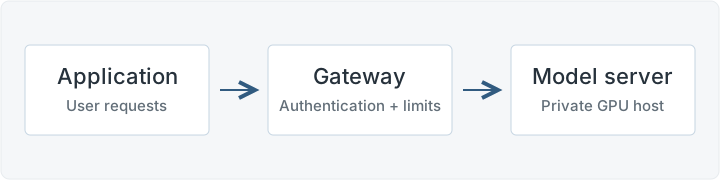
What “local” means here
You run the model’s weights on infrastructure you control: an office server or a rented GPU machine. Your application calls that server for answers. For production, give it a dependable host, a repeatable setup, and an owner who can respond when it fails.
1. Pick the tool that removes the most work
- Ollama is an easy starting point. It handles downloading and running models and exposes an API. Start with its quickstart for a small internal tool, then test your expected traffic. It supports parallel requests when memory allows; context length and concurrency both affect memory use.
- vLLM is a useful default to evaluate for a shared GPU service. It batches generation work across requests and provides an OpenAI-compatible API. That makes it convenient when several users need answers at once. Choose by measured latency and throughput on your workload.
These tools handle inference. Your application still needs access control, request limits, and failure handling. For Ollama, select local model weights; its local-only setting disables cloud features when that is a requirement.
2. Choose a model that fits the job and the GPU
Start with a small instruction-tuned model and a handful of real tasks. Check answer quality, required languages, and the model’s license. GPU memory must cover the weights, runtime overhead, and the attention cache used by active requests. Longer conversations and more simultaneous users need more room.
Quantization stores weights at lower precision to reduce memory use, but can change quality. Measure it. Set a realistic context limit before buying hardware; vLLM’s tuning guide explains the memory and concurrency tradeoffs.
3. Bring up one private endpoint
On a Linux host with a supported GPU and drivers, follow the vLLM installation guide. Set VLLM_API_KEY to a strong secret in the server’s environment, then start a small example model:
vllm serve Qwen/Qwen2.5-1.5B-Instruct \
  --host 127.0.0.1 \
  --port 8001 \
  --max-model-len 4096
The first start downloads the weights. Once the model is ready, send a request from another terminal on the same host, with the same key set in its environment:
curl http://127.0.0.1:8001/v1/chat/completions \
  -H "Authorization: Bearer $VLLM_API_KEY" \
  -H "Content-Type: application/json" \
  -d '{
    "model": "Qwen/Qwen2.5-1.5B-Instruct",
    "messages": [{
      "role": "user",
      "content": "Explain a database index in one sentence."
    }],
    "max_tokens": 128,
    "temperature": 0
  }'
A JSON response with an answer under choices confirms the connection. A backend on the same host can use http://127.0.0.1:8001/v1; a remote backend should use your authenticated gateway. The 4,096-token limit covers input and output together. This model is a setup example; evaluate it before choosing it for the product.
4. Make it a service people can rely on
- Put access control in front. Keep inference private and let your backend or an authenticated HTTPS gateway call it. Allow only needed routes, and use a host firewall to keep the model server and internal worker ports private. vLLM’s API key does not protect every endpoint; Ollama’s local API has no built-in authentication. Keep credentials out of browser code.
- Bound the work. Enforce input and output limits, timeouts, and a bounded queue. Return a clear busy response when capacity is exhausted. Configure proxy timeouts for streamed answers, too.
- Handle restarts. Run under a service manager or container with a restart policy. Load and warm the model, then pass a readiness check before routing traffic. Pin tested software versions and model revisions so you can reproduce a deployment and roll back.
- Test real demand. Send representative requests concurrently. Track time to first token, total latency, errors, queue growth, and GPU memory. Compare the slowest 5% of requests with your target; a fast single prompt does not establish capacity.
Start with one measured instance. Add replicas when demand or availability requires them, and keep the previous working model ready for rollback.
Go a little deeper
- Install vLLM and serve an OpenAI-compatible APIvLLM documentation
- Protect the server and allow only the routes you needvLLM security guide
- Configure memory, concurrency, and local-only operationOllama FAQ
- Understand Ollama’s local API authenticationOllama documentation
An introductory synthesis of the linked documentation. The diagram is original to this note. Commands depend on your hardware and installed version.