RAG: give your model the right context
Search your documents, give the model useful evidence, and check where its answer came from.
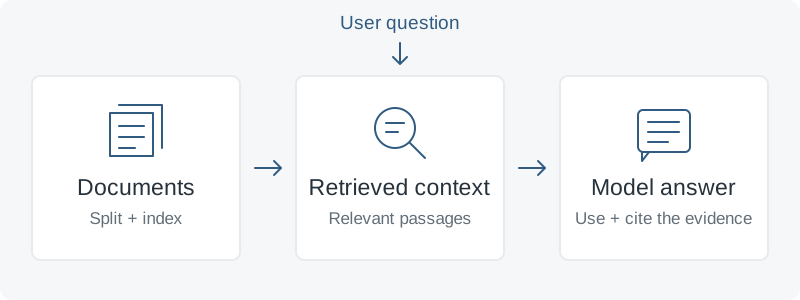
Give the model something useful to read
Retrieval-augmented generation (RAG) finds relevant information and puts it into the model’s context before it answers. Imagine asking about an internal API: the application looks up the relevant documentation, then asks the model to answer using those passages. A basic RAG pipeline does this without changing the model’s weights.
RAG or fine-tuning?
- Use RAG for information the model needs to look up: product documentation, internal guides, or facts that change. Update the searchable content when the source changes.
- Consider fine-tuning for a repeatable task, format, or style that prompting has not made consistent enough. It changes model behavior through training examples.
- You can combine them. An adapted model can still retrieve current information. For a few short documents that comfortably fit in context, try supplying them directly first.
1. Prepare the documents for search
Keep useful text, headings, and source identifiers; remove repeated navigation and stale copies. Split long documents into passages, or chunks, that retain enough context to make sense. An embedding model turns each chunk into a list of numbers representing its meaning. A vector index can then find chunks similar to a question embedded with the same model.
Start with a few clean text files. Check what the parser actually extracted before adding PDFs or scanned documents. Keep filenames or URLs alongside the text so readers can inspect the evidence.
2. Try LlamaIndex with Ollama
LlamaIndex handles loading, chunking, indexing, retrieval, and assembling an answer. Ollama runs both the language model and the embedding model locally. This small Python example uses an in-memory index, so you do not need a separate database to try it.
Follow the Ollama quickstart and keep its server running. Use a current release; the embedding model below needs Ollama 0.11.10 or later. In a Python virtual environment, install the integrations and download these two example models:
pip install llama-index-core llama-index-llms-ollama llama-index-embeddings-ollama
ollama pull llama3.2:3b
ollama pull embeddinggemma
Create a data folder beside rag.py. For a first check, put this fictional documentation in data/api.txt:
The example API allows 120 requests per minute per workspace.Save the following as rag.py and run python rag.py from that folder:
from llama_index.core import Settings, SimpleDirectoryReader, VectorStoreIndex
from llama_index.core.query_engine import CitationQueryEngine
from llama_index.llms.ollama import Ollama
from llama_index.embeddings.ollama import OllamaEmbedding

Settings.llm = Ollama(
    model="llama3.2:3b", request_timeout=120.0,
    context_window=4096, temperature=0,
)
Settings.embed_model = OllamaEmbedding(
    model_name="embeddinggemma", base_url="http://localhost:11434",
)
Settings.chunk_size = 512
Settings.chunk_overlap = 64

documents = SimpleDirectoryReader(
    "data", required_exts=[".txt"], recursive=True,
).load_data()
index = VectorStoreIndex.from_documents(documents)
engine = CitationQueryEngine.from_args(
    index, similarity_top_k=3, citation_chunk_size=512,
)
response = engine.query("How many requests per minute does the API allow?")
print(response)
for number, source in enumerate(response.source_nodes, 1):
    print(f"[{number}] {source.node.metadata.get('file_name', 'unknown')}")
    print(source.node.get_content())
The query engine retrieves up to three matching chunks and asks the model to answer with numbered citations. The loop prints the corresponding passages for inspection. Both models are explicitly local; choose models that fit your hardware and languages. The chunk sizes are starting values, not universal defaults.
3. Check the search and the answer separately
First check whether retrieval found the passage containing “120 requests per minute per workspace.” Then check whether the answer preserves the limit and cites that passage. A citation is something to verify; it does not prove that the answer is supported.
Try a differently worded question and one the file cannot answer, such as the monthly quota. The system should acknowledge missing evidence. If it guesses, improve retrieval, prompting, or model choice before using it. For a larger collection, keep a small set of questions with expected supporting passages and repeat these checks after changes.
4. Keep it useful as the collection grows
- Keep the index current. This demo rebuilds it on each run. A service should persist it and handle changed or deleted documents. Re-embed the collection if you change the embedding model.
- Retrieve only permitted content. Apply access checks before passages enter the prompt, and treat retrieved text as data rather than trusted instructions.
- Improve the failing step. If exact names or error codes are missed, evaluate keyword search alongside vector search. Add reranking to reorder candidates only when your checks show a benefit.
When you turn the demo into a shared service, the local LLM production note covers the serving side: private endpoints, request limits, and reliable restarts.
Go a little deeper
- Understand the stages of a RAG pipelineLlamaIndex documentation
- Build answers with numbered source passagesLlamaIndex citation query engine
- Use an embedding model for document searchOllama documentation
- Update and remove indexed documentsLlamaIndex documentation
- Improve retrieval when relevant context is missedAnthropic engineering
An introductory synthesis of official LlamaIndex and Ollama documentation, with retrieval guidance from Anthropic. The API documentation and diagram are illustrative originals. Model output and setup requirements depend on your hardware and installed versions.